Dark and light reading modes
Choose the site default in the Customizer. Visitors can switch modes with the border-free header control, and their choice is remembered locally in the browser.
Free and open source
Web Host Pro Blog keeps the reading experience central without requiring a page builder. Optional publishing features are supplied by one free companion plugin so the theme follows WordPress.org requirements.
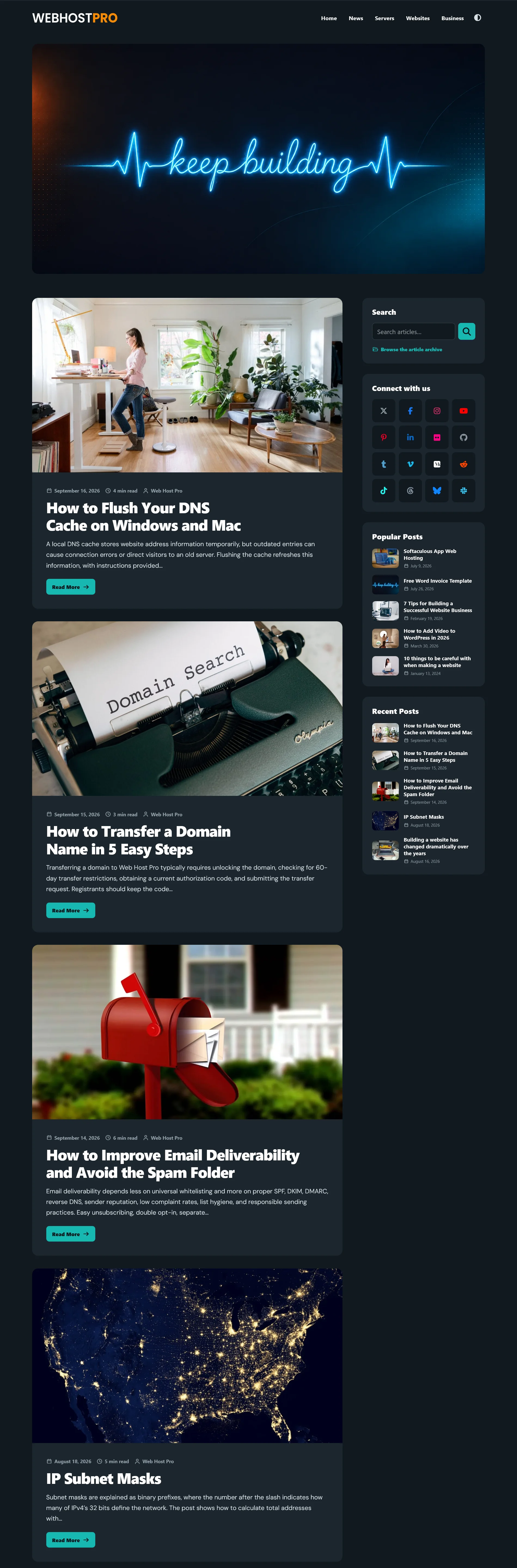
Scroll inside the preview to see the full theme page. Content, logo, menu, images, and colors can be changed in WordPress.
The theme ZIP is complete and installable on its own. The separate tools plugin is optional and adds functional publishing features. Neither download requires a premium extension, remote font, license key, or subscription.
Choose the site default in the Customizer. Visitors can switch modes with the border-free header control, and their choice is remembered locally in the browser.
Responsive feed cards, featured images, automatic reading time, post navigation, tags, comments, and three related articles with thumbnails.
The companion plugin can generate a collapsible heading-based table of contents for selected posts from the Article Tools panel.
A small reading-mode control hides the sidebar and expands the article without loading a separate page template.
The companion plugin adds play, pause, resume, restart, system voices, speed controls, progress, and paragraph highlighting. It is off by default.
Create a compact archive page grouped by category with post counts, title filtering, newest or alphabetical sorting, and no thumbnails.
The companion plugin adds colored profile icons and configurable post sharing for X, Facebook, LinkedIn, Bluesky, Threads, Pinterest, Tumblr, WhatsApp, Reddit, and email.
Optional search, promotional image, popular posts, recent posts, flexible width, and left or right placement. The plugin can add social profiles.
Keyboard focus styles, semantic landmarks, accessible control labels, reduced-motion support, responsive navigation, and mobile-friendly layouts are included.
Theme design controls are under Appearance, Customize, and Web Host Pro Blog Options. Optional functional controls are under Settings and Blog Tools after the companion plugin is activated.
The ZIP is ready for the standard WordPress theme installer. Back up an existing site before changing an active theme.
Save web-host-pro-blog-2.3.0.zip to your computer. Do not extract it before using the WordPress installer.
Open Appearance and select Themes, Add New Theme, and Upload Theme. Choose the ZIP, select Install Now, then activate it after WordPress confirms the installation.
Open Appearance and select Customize. Add a logo under Site Identity, choose the brand display and width, then assign a menu to the Primary Menu location under Appearance and Menus.
Open Web Host Pro Blog Options and select Appearance. Select Default dark or Default light, then review the supplied colors. Visitors can still use the header toggle.
Review Announcement Bar, Header & Hero, Blog Feed, and Sidebar. Add a hero image, decide whether it needs text, choose excerpt and image proportions, and enable only the sidebar sections you need.
Add a new WordPress page named Blog Archive. In the page settings, select the Blog Archive template and publish it. The theme automatically fills it with current posts and categories.
Download web-host-pro-blog-tools-1.0.0.zip, then install it under Plugins, Add New Plugin, and Upload Plugin. Open Settings and Blog Tools. Every global feature is initially off.
With the companion active, edit any post to enable its automatic table of contents. Text-to-speech, sharing, social profiles, comment controls, and registration controls are managed under Settings and Blog Tools.
Check the blog home, a long article, search, the archive, comments, navigation, sharing links, and both color modes on desktop and mobile.
Web Host Pro Blog is intentionally focused. It is a strong fit when clear publishing controls matter more than a general-purpose visual builder.
WordPress 6.5 or newer and PHP 8.3 or newer. A custom logo and assigned primary menu are recommended but not required.
No demo content, hosting account, domain, managed installation, page builder, commerce templates, or guaranteed support response is bundled with the theme.
Popular posts are ranked by comment count. System voices vary by browser and device. Custom colors apply to the selected default mode while the alternate mode uses its companion palette.
These short statements explain the download in plain language. The LICENSE file included in the ZIP remains the controlling software license.
The theme is provided at no charge under the GNU General Public License version 2 or later. You may use, study, modify, and redistribute it under that license.
The software is provided without warranty. You are responsible for backups, compatibility testing, accessibility review, content, security, and compliance on sites where you install it. Web Host Pro names and trademarks are not granted for unrelated branding or endorsement.
Review the included GPLv2 license before redistribution.
The theme does not make external font, icon, analytics, advertising, licensing, or update-check requests. The visitor theme preference is stored in that browser. Optional browser narration runs locally with voices available on the visitor’s device and does not send article text to Web Host Pro.
Social sharing and profile links open a selected third-party service only after a visitor clicks. WordPress, other installed plugins, comments, hosting logs, and site-owner analytics may process data separately and remain the responsibility of the site owner.
Downloading from this page does not require an account. Standard Web Host Pro site logs and the main Privacy Policy apply to visits and downloads.
Install the directory-ready theme, then add the optional tools plugin only if you need its publishing features.